How Workflow Automation Helps CPA Firms Deliver Tax Returns Faster in 2026?



Tax season does not slow down because firms lack effort. It slows down when returns depend on scattered documents, unclear ownership, manual follow-ups, and last-minute status checks. For CPA firms in the United States, faster delivery starts with a tax workflow automation system that keeps every return moving with clear next steps, visible accountability, and fewer administrative delays.
For CPA firms in the United States, speed is rarely about working harder. Faster delivery comes from building a tax workflow automation system that moves returns forward with fewer pauses, clearer ownership, and less manual follow-up.
That is where digital tax workflows make a practical difference. When document collection, task routing, data entry, review notes, client reminders, e-signatures, and filing steps are connected, firms can reduce tax return turnaround time, improve visibility, and protect review quality during peak season.
The goal is not to remove CPAs from the process. The goal is to remove repetitive friction so tax professionals can focus on judgment, review, planning opportunities, and client service.
In this guide, we look at where tax workflows usually break down, which tasks CPA firms should automate first, how automation supports outsourced tax preparation, and which KPIs help firms measure whether the process is actually improving.
“The fastest tax workflows are not built by rushing preparers. They are built by removing the delays that keep returns waiting between intake, preparation, review, approval, and filing.”
Cora Vollmar, Sr Growth VP, QX Accounting Services
- What Changes When Tax Workflows Are Automated?
- Why Tax Return Turnaround Time Slows Down?
- How Workflow Automation Improves Tax Return Turnaround Time
- Which Tax Preparation Tasks Should CPA Firms Automate?
- How Workflow Automation Reduces Tax Preparation Errors
- What Role Does AI Play in Modern Tax Workflows?
- How Automation Improves Client Satisfaction During Tax Season
- How Automation Integrates With Outsourced Tax Preparation?
- Why CPA Firms Combine Workflow Automation With Outsourced Tax Support?
- What CPA Firms Should Confirm Before Combining Automation and Outsourced Tax Support
- A Practical Roadmap for Implementing Tax Workflow Automation
- KPIs to Track After Implementing Workflow Automation
- Common Tax Workflow Automation Mistakes
- Conclusion
- FAQs
What Changes When Tax Workflows Are Automated?
- Returns move with fewer pauses because ownership and status remain visible.
- Standardized workpapers and checklists reduce preventable rework.
- Clients receive clearer document requests, reminders, signatures, and status updates.
What Workflow Automation Means in a Tax Firm?
Workflow automation for CPA firms is the use of software, rules, integrations, and standardized processes to move tax work from intake to filing with less manual coordination.
In a traditional tax workflow, a single return may move through several disconnected systems:
- Email for document requests
- A shared drive for file storage
- A spreadsheet for status tracking
- Tax software for preparation
- Another platform for e-signatures
- Manual reminders for client follow-up
- Review comments stored in a separate location.
That setup may work when return volume is low. During busy season, it creates delays because every step depends on someone remembering to check, update, assign, or chase something manually.
Thomson Reuters describes digital tax workflow as managing tax preparation, review, filing, document storage, data integration, and collaboration through connected online tools such as secure client portals, automated data input, digital review, real-time collaboration, electronic filing, and cloud-based storage.
In practical terms, tax workflow automation helps a firm answer three questions at any moment:
- What is the status of each return?
- Who owns the next step?
- What is preventing the return from moving forward?
When those answers are visible, firms can manage tax season proactively instead of discovering bottlenecks when deadlines are approaching.
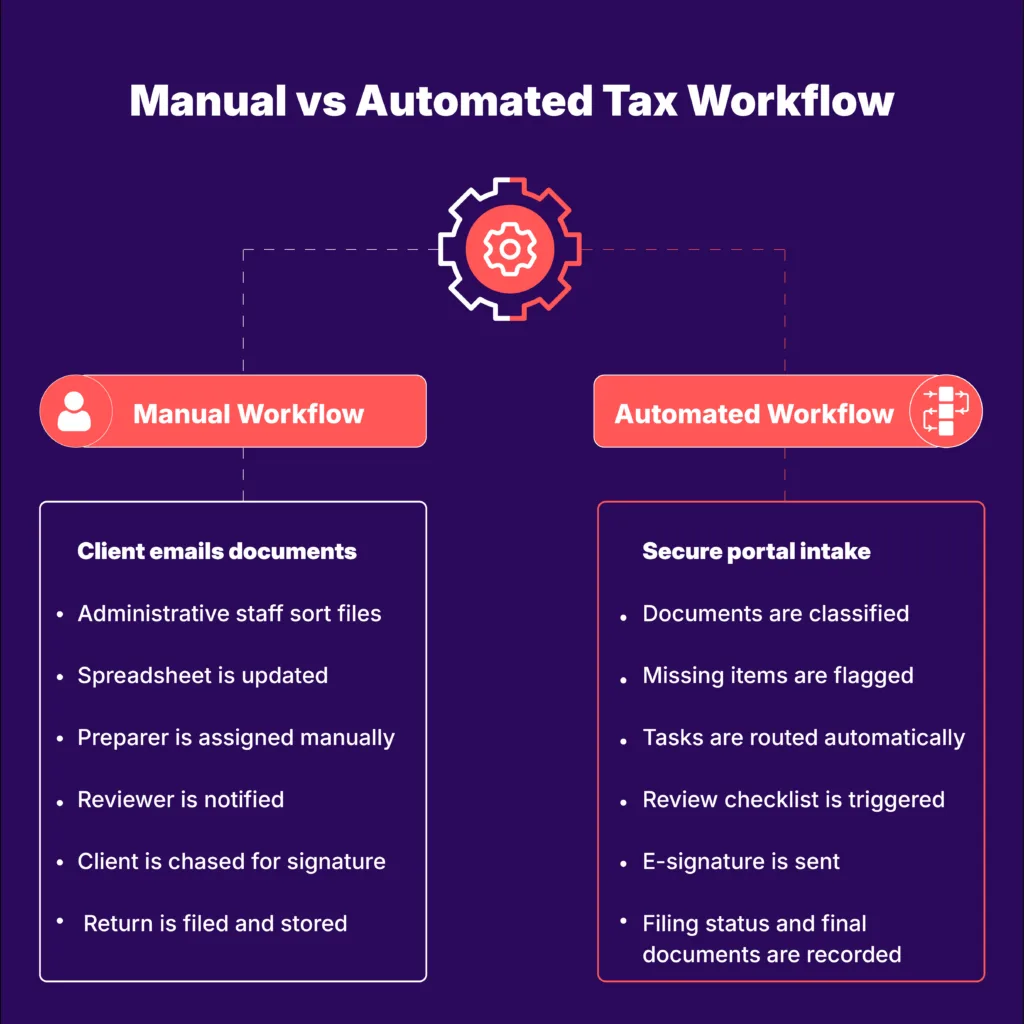
Why Tax Return Turnaround Time Slows Down?
Before automating, firms need to understand where returns are getting stuck.
In many firms, tax returns do not slow down because the technical work is impossible. They slow down because the administrative work around preparation is fragmented, manual, and hard to monitor at scale.
Common causes of delay include:
- Clients being unclear about which documents are missing
- Staff manually renaming, sorting, and saving files
- Preparers waiting for prior-year data or organizer responses
- Reviewers receiving incomplete workpapers
- Review notes being scattered across emails and systems
- Partners lacking real-time visibility into workload
- Returns waiting for e-signature or filing authorization
- Outsourced preparers waiting for complete source documents
For an individual Form 1040, even a relatively straightforward return can slow down when documents arrive in pieces. The Internal Revenue Service explains that Form 1040 is used by U.S. taxpayers to file an annual income tax return.
For business returns, delays can multiply because the workflow may include books, payroll information, depreciation schedules, K-1s, state filings, owner questions, and several levels of review.
Electronic filing is also part of the workflow. The IRS Modernized e-File program supports electronic filing across individual, corporate, partnership, employment, estate and trust, exempt-organization, excise, and other return families.
Workflow automation helps turn these moving parts into a repeatable process.
How Workflow Automation Improves Tax Return Turnaround Time
Workflow automation improves turnaround by reducing idle time between steps. A return does not move faster only because preparation takes less time. It moves faster because the workflow prevents work from sitting unnoticed.
1. Faster Document Intake
Instead of emailing clients repeatedly, firms can use secure portals, digital organizers, and automated request lists. Clients receive a clear checklist, upload documents in one place, and receive reminders when items are missing.
For example, a Form 1040 client may receive requests for W-2s, 1099s, mortgage interest statements, brokerage reports, charitable contribution details, and estimated tax payment confirmations.
As documents arrive, the workflow can show which items have been received and which items are still outstanding. This shortens the “waiting on client” stage, which is often one of the biggest contributors to tax return delays.
2. Less Manual Sorting and Routing
In a manual process, staff may spend valuable time downloading attachments, naming files, creating folders, and alerting preparers.
With tax process automation, documents can be classified, assigned, and routed based on established workflow rules. Preparers can start sooner because files arrive more complete and organized.
3. Clearer Task Ownership
Automated workflows can assign tasks based on return type, complexity, deadline, staff role, or office location. A Form 1040 with Schedule C activity may follow one workflow, while a multi-state S corporation return follows another.
Each stage has a defined owner:
- Intake review
- Missing-information follow-up
- Preparation
- Initial review
- Partner review
- Client questions
- E-signature
- Filing
- Delivery and archiving
Clear ownership reduces the number of returns that stall because someone assumed another team member was handling the next step.
4. Real-Time Visibility
Dashboards allow managers and partners to identify bottlenecks before they become emergencies.
If several returns are waiting for client responses, the firm can trigger a reminder campaign. If one reviewer has an excessive queue, work can be reassigned. If an outsourced team is waiting for documents, the internal team can prioritize intake completion.
Visibility makes the workflow easier to manage and gives leadership a more accurate view of tax-season capacity.
Which Tax Preparation Tasks Should CPA Firms Automate?
The strongest candidates are repetitive, rules-based, and high-volume activities that do not require fresh professional judgment every time.
The best place to start is not the task that looks most modern. It is the task that creates the most repeatable delay, consumes the most staff time, or causes the most client follow-up during busy season.
CPA firms can automate:
- Client organizers, document requests, and reminders
- Document naming, classification, and routing
- Data extraction and approved tax software integrations
- Task assignment and workflow status updates
- Deadline, extension, and e-signature tracking
- Review checklists and missing-information alerts
- Final document delivery and archiving
Not every step should be automated. Tax positions, planning recommendations, complex review questions, unusual transactions, and client advisory conversations still require human expertise.
The right automated tax preparation process gives professionals more time to apply that expertise.
If firms are comparing workflow platforms, QXAS’s Tax Automation Buyer’s Checklist can help them evaluate integrations, workflow controls, security, reporting, scalability, and vendor support before choosing a solution.
Also read: Tax Preparation Services in 2026: How Automation and Expert Review Deliver Better Outcomes.
How Workflow Automation Reduces Tax Preparation Errors
Tax preparation errors often come from manual rekeying, inconsistent review steps, missing documents, version-control problems, or rushed communication. Automation reduces these risks by standardizing the process.
Automated checklists can prevent a return from moving to review until required documents are attached. Data integrations can reduce duplicate entry. Digital review notes can keep comments connected to the correct return. Standardized workpaper organization makes it easier for reviewers to trace amounts back to source documents.
Thomson Reuters notes that automated tax workflows can support document management, task tracking, client communication, data input, and error checking. Automated workflows can also flag discrepancies, missing information, or potential issues before filing.
Speed without quality is not a win. A faster return that requires significant rework, an amendment, or extensive post-filing explanation can reduce profitability and damage client trust. Effective workflow optimization improves both speed and control.
What Role Does AI Play in Modern Tax Workflows?
Artificial intelligence is becoming a practical part of modern tax operations, particularly where firms need to process large volumes of information quickly.
AI-powered tools can support:
- Reading and classifying source documents
- Extracting data from W-2s, 1099s, K-1s, and brokerage statements
- Matching extracted information to tax software fields
- Identifying missing or inconsistent information
- Summarizing client responses or document packages
- Drafting internal notes and client follow-up messages
- Prioritizing returns that may require additional review
AI-powered tax preparation is most useful when it operates inside a controlled workflow with defined review standards, clear exception handling, and human accountability.
AI can accelerate intake, organization, and initial analysis. CPAs should still review outputs, determine the appropriate tax treatment, respond to exceptions, and apply professional judgment.
Think of AI as a capacity multiplier, not a replacement for expertise. AI gives tax professionals more time to ask questions such as:
- Does this client have a planning opportunity?
- Does a business owner need estimated tax adjustments?
- Does this return require additional state-level review?
- Is there a mismatch between current documents and prior-year expectations?
When firms combine AI with clear review standards, work can move faster without weakening accountability.
How Automation Improves Client Satisfaction During Tax Season
Clients usually judge tax season by three factors:
- How easy the process feels
- How clearly the firm communicates
- How quickly the return is completed
Workflow automation can improve all three.
Easier Document Collection
Clients do not want to search through old email threads to determine what they still owe the firm. A secure portal with a clear checklist is easier to use. Automated reminders can reduce unnecessary back-and-forth.
Better Transparency
Automated status updates help clients understand where their return stands. Even a simple message such as “Your documents are in review” or “Your return is awaiting signature” can reduce uncertainty.
Faster Responses
When staff can see the client file, document history, outstanding requests, and workflow status in one place, they can respond faster. No one needs to ask multiple team members whether a document has been received.
A More Professional Experience
Digital tax workflows help firms appear more organized. That matters when clients compare their tax experience with the digital services they receive from banks, payroll providers, and business software platforms.
A smoother process also creates room for more meaningful conversations. Instead of using every interaction to request missing documents, firms can discuss planning opportunities, cash flow, entity structure, retirement contributions, and estimated tax strategy.
For many firms, automation solves the movement of work, but it does not always solve the volume of work. That is why workflow automation often becomes more valuable when it is paired with a capacity strategy.
How Automation Integrates With Outsourced Tax Preparation?
Many CPA firms combine workflow automation with outsourced tax support to manage peak-season demand. Automation makes that model easier to control.
Without a structured process, outsourced preparation can create uncertainty around:
- Which returns are ready to assign
- Whether all source documents are complete
- Which instructions the preparer should follow
- Where questions and exceptions should be raised
- Who reviews the completed work
- How review notes should be resolved
Automation creates a defined handoff. A structured outsourced workflow may work like this:
- The internal intake team confirms that required documents have been received.
- The workflow marks the return as ready for outsourcing.
- The outsourced preparer receives the standardized workpaper package.
- Questions are submitted through the workflow platform.
- Internal staff review the completed work using a consistent checklist.
- Partner review, client approval, and final filing remain within the firm.
This model gives firms additional capacity while keeping control over quality, deadlines, filing approval, and client communication.
A structured workflow also makes outsourced tax preparation easier to manage because files, instructions, questions, status updates, and review steps move through one defined process instead of scattered emails or ad hoc handoffs.
Explore QXAS’s tax preparation outsourcing services to see how firms can add preparation capacity while keeping review and client ownership in-house.
Why CPA Firms Combine Workflow Automation With Outsourced Tax Support?
Workflow automation improves process control. Outsourced tax support expands preparation capacity.
During peak season, even a well-run internal tax team can reach its limit. Hiring experienced tax professionals is difficult, training takes time, and sustained overtime can contribute to burnout.
Outsourced preparation support can help firms absorb additional volume, but only when the work is organized before it leaves the firm.
Together, automation and outsourced support can help firms:
- Complete more returns without overloading internal staff
- Protect senior professionals’ time for review and advisory work
- Reduce administration involved in preparing files for external teams
- Improve consistency across internal and outsourced preparers
- Track outsourced return status inside the same workflow
- Maintain an audit trail of questions, responses, and review notes
- Protect the client experience through standardized communication
The key is to avoid treating outsourcing as a last-minute overflow measure. It works best when it is designed into the tax workflow from the beginning.
Compare QXAS’s engagement models to decide whether seasonal support, a dedicated team, or a flexible capacity model fits your tax workflow best.
Firms evaluating a broader capacity model can also explore how to scale tax preparation without expanding internal teams.
What CPA Firms Should Confirm Before Combining Automation and Outsourced Tax Support
Before connecting an outsourced team to an automated workflow, confirm that:
- Scope and ownership are clearly documented.
- Files follow a consistent “ready for preparation” standard.
- Internal and outsourced preparers use the same status definitions.
- Questions and exceptions follow one escalation process.
- Review responsibility remains within the CPA firm.
- Access permissions and audit trails are documented.
- Performance is measured through turnaround, rework, and review readiness.
Automation and outsourcing create the most value when they operate within the same delivery model, not as separate solutions. If pricing and budget planning are part of your outsourcing decision, review QXAS’s accounting and bookkeeping outsourcing pricing for a clearer view of how outsourced support can be structured.
A Practical Roadmap for Implementing Tax Workflow Automation
Firms do not need to automate everything at once. The most effective implementations usually start with the largest bottlenecks.
Step 1: Map the Current Workflow
Document every step from client onboarding to final delivery. Identify who owns each task, which platforms are used, and where delays occur.
Ask:
- Where do returns sit the longest?
- Which steps require the most manual follow-up?
- Which tasks are duplicated across systems?
- Where do review notes get lost?
- Which client issues repeat every year?
Step 2: Standardize Before Automating
Automation will not fix a chaotic process. It will make the chaos move faster.
Create standard workflows for common return types, including:
- Individual Form 1040 returns
- Complex individual returns
- Business returns
- Trust and estate returns
- Extensions
- Outsourced preparation
- Amended returns
Each workflow should define required documents, task ownership, review stages, exceptions, and delivery requirements.
Step 3: Automate Client-Facing Friction
Begin with digital organizers, document request lists, secure uploads, automated reminders, and e-signature routing.
These changes are visible to clients and can improve satisfaction quickly.
Step 4: Automate Internal Routing and Review
Next, focus on task assignment, preparer queues, review checklists, status dashboards, and deadline alerts.
This helps managers balance workloads and prevents returns from stalling unnoticed.
Step 5: Introduce AI Carefully
Once the workflow is stable, evaluate AI tools for document classification, data extraction, summarization, and exception detection.
Keep human review embedded in the workflow, particularly for complex returns and unusual tax positions.
Step 6: Review and Improve
Workflow optimization is not a one-time project. After each filing season, review what worked, where returns stalled, and what should change before the next busy season.
KPIs to Track After Implementing Workflow Automation
Firms do not need dozens of metrics. Start with a small dashboard that measures whether automation is reducing friction.
Track:
- Average return turnaround time
Measure the number of days from complete document receipt to delivery. - Time spent in each workflow stage
Track time in intake, preparation, review, client approval, and filing. - Review notes or rework per return
Identify quality issues, unclear standards, and training needs. - Missing-document rate
Measure how often returns enter preparation without complete source documents. - On-time filing rate
Track returns completed against internal targets and statutory deadlines. - Reviewer and overtime hours
Measure whether automation is reducing pressure on the firm’s most limited capacity.
Review these KPIs weekly during tax season and use them to make staffing, routing, and process decisions.

Common Tax Workflow Automation Mistakes
Automating a Broken Process
If the firm has no standard definition of “ready for preparation,” automation will not solve the problem. Standardize first.
Choosing Tools Without Involving Staff
Preparers, reviewers, administrative staff, and client service teams understand where the daily friction occurs. Include them when selecting and configuring workflow tools.
Over-Automating Client Communication
Automated reminders are useful, but clients still need human support for complex questions, sensitive circumstances, and high-value relationships.
Ignoring Data Security
Tax workflows contain sensitive personal and financial information. Firms should use secure platforms, role-based access, encryption, documented controls, and activity monitoring.
IRS Publication 4557 addresses security planning, multi-factor authentication, encryption, access restrictions, backups, audit logs, and other safeguards for protecting taxpayer data.
When evaluating workflow platforms or outsourced service providers, firms can also use AICPA SOC resources to understand controls relevant to security, availability, processing integrity, confidentiality, and privacy.
Failing to Train the Team
Even the best workflow platform will fail if people do not use it consistently. Training should explain not only how the platform works, but why each workflow standard matters.
Conclusion
Tax workflow automation is not simply a technology upgrade. It is an operating model for a faster, cleaner, and more scalable tax season.
For CPA firms in the United States, the opportunity is to build digital tax workflows that reduce administrative work, improve visibility, support AI-powered tax preparation, and make collaboration easier across internal and outsourced teams.
The firms that benefit most will not simply be the ones that buy software. They will be the ones that standardize processes, automate the right tasks, train their teams, monitor the right KPIs, and improve their workflows after every filing season.
When workflow automation is implemented well, returns move faster, staff work with less disruption, clients stay better informed, and partners gain the visibility needed to manage tax season with confidence.
Automation improves how work moves. Outsourced tax support adds the capacity to keep it moving during peak season.
If your firm wants faster turnaround without adding pressure to reviewers, QX Accounting Services USA tax preparation outsourcing services can help you build a scalable workflow where preparation capacity expands while review, filing approval, and client responsibility stay with your firm.
FAQs
How does workflow automation improve tax return turnaround time?
Workflow automation reduces idle time between steps by keeping every return moving through a defined process. Automated document requests, reminders, task routing, review checklists, and status dashboards help teams see what is ready, what is waiting on the client, and what needs reviewer attention. This reduces back-and-forth follow-ups and prevents returns from sitting unnoticed between intake, preparation, review, signature, and filing.
Which tax preparation tasks should CPA firms automate?
Start with repetitive tasks that create avoidable delays, such as client organizers, document requests, reminders, file naming, document routing, deadline tracking, review checklists, e-signature routing, and status updates. Once these basics are standardized, firms can add AI-assisted document classification and data extraction to speed up preparation. The goal is not to automate every step at once, but to remove the tasks that consume staff time and slow down reviewers during peak season.
How does workflow automation reduce tax preparation errors?
Automation reduces manual data entry, standardizes review stages, flags missing information, improves version control, and keeps documentation organized in one place. It also makes it easier to confirm whether source documents are complete before preparation begins. These controls help preparers and reviewers identify issues earlier, reduce rework, and maintain consistency across returns even when volumes increase.
What role does AI play in modern tax workflows?
AI can help classify documents, extract tax data, identify inconsistencies, summarize information, and support faster preparation. It is most useful when it sits inside a controlled workflow with clear review standards, exception handling, and human accountability. CPAs still need to review AI outputs, resolve judgment-based issues, and confirm that the final return meets firm quality standards.
How can workflow automation improve client satisfaction during tax season?
Clients receive clearer document requests, easier uploads, faster reminders, better status visibility, and a smoother signature and delivery process. Instead of sending multiple emails or asking for status updates, they can understand what is required and where their return stands. This makes tax season feel more organized, reduces frustration, and improves the overall client experience.
How does automation integrate with outsourced tax preparation teams?
Automation creates a structured handoff between the firm and outsourced preparers. It confirms when files are complete, routes work to the right team, centralizes questions, tracks status, and returns completed work to the firm’s review workflow. This helps firms avoid scattered email threads, missed instructions, and unclear ownership while keeping review and client responsibility with the internal team.
What KPIs should firms track after implementing workflow automation?
Track average turnaround time, time in each workflow stage, rework per return, missing-document rate, on-time filing percentage, and reviewer or overtime hours. These KPIs show whether automation is actually reducing friction or simply digitizing the same bottlenecks. Firms should review these metrics during and after busy season to understand where returns still slow down and which workflow stages need improvement.
Why do CPA firms combine workflow automation with outsourced tax support?
Automation standardizes the process, while outsourced tax support expands preparation capacity. Together, they help firms manage peak-season volume without pushing more administrative work onto partners, managers, or reviewers. Internal professionals retain review, client communication, advisory work, and filing responsibility, while outsourced teams support preparation through a clearer, more controlled workflow.
Enquire now

Cora Vollmar
With over 20 years of experience in accounting, talent strategy, operations, and business development, Cora Vollmar helps CPA firms solve capacity challenges and build scalable growth strategies. She is an expert in senior-level accounting and CPA recruiting, with a proven track record of helping firms develop talent pipelines, recruit leadership professionals, and address the ongoing accounting talent shortage.
Through strong relationships with State CPA Societies, accounting alliances, and industry organizations, Cora brings valuable insight into firm growth, talent trends, and the future of the profession. At QX Accounting Services, she helps firms leverage global talent, managed services, and workforce strategies to build sustainable capacity and support long-term growth.
Unauthorized copying or plagiarism of our content is a violation of intellectual property rights. We take such matters seriously and will pursue legal action to protect our original work. Anyone found engaging in such activities will be held accountable under applicable laws.
Don't forget to share this post!
Our Latest Insights




Let’s Work Together
Explore outsourcing solutions, request a no-obligation trial or discuss your practice’s needs with our expert consultants.
 Book a Virtual Meeting
  Get Your ROI Estimate