
1. ROBO1040: Software Requirements
1) ROBO1040: Web based solution
2) Lacerte: Software Requirements
3) ProSeries: Software Requirements
4) ProConnect: Software Requirements
5) GoRS: Software Requirements
6) Drake: Software Requirements
- ROBO1040: Software Requirements
- 1.1ROBO1040: Web based solution
• IP Whitelisting need to be done for ROBO1040 Web URL.
• Need to provide permission to access, upload, and download documents from your RDP system to the ROBO 1040 portal.
- 1.2Lacerte: Software Requirements
1)Download and install, .NETCore with minimum version of 6 or higher. Link – https://aka.ms/dotnet-coreapplaunch?missing_runtime=true&arch=x64&rid=win10-x64&apphost_version=6.0.24 2.
2)Install Lacerte SDK for 2023 version Download and install the relevant Lacerte SDK file based on your system configuration
Link – https://developer.intuit.com/app/developer/lacerte-sdk/docs/lacerte-get-started3)ODBC connector configuration
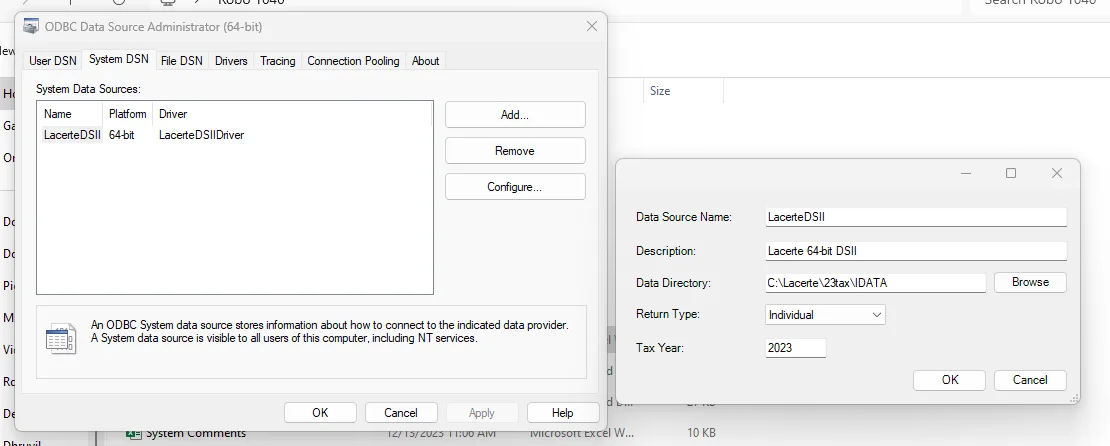
- • To configure the Lacerte bases system version – 32 bit OR 64 bits.
- • Search ODBC in the start menu and configure the System DNS as below.
- • Click on the first-row value, then click on the Configure button.
- o Updated Tax Year as per Tax Software release year.
- o Data Directory path will be auto-fetched as per SDK installation path on system.
4)Download and install the Lacerte EXE file from ROBO1040 web portal.
- 1.3ProSeries: Software Requirements
1)Install Tesseract OCR dependencies
2)Download and install the ProSeries EXE file from ROBO1040 web portal.
- 1.4ProConnect: Software Requirements
1)Download and install the ProConnect EXE file from ROBO1040 web portal.
2)From the EXE folder, file name – ‘Config.ini’. Open it & update the field – Username and Password with your ROBO1040 login credentials. Also update the UserDir path with the path of Chrome driver on your system.
3)Chrome drivers need to be installed & updated.
- 1.5GoRS: Software Requirements
1)Needs to provide API keys of their Account to connect with GoSystem RS.
- 1.6Drake: Software Requirements
1)Download and install the Drake EXE file from ROBO1040 web portal.
-
